2026-10-07 · 2 min
The art of system design
A simple framework for approaching system design (with a reusable architecture diagram)
With AI making it easier to write code, understanding the bigger picture of how software is designed and how systems fit together feels increasingly important.
Building software isn't just about writing the code. There are decisions around how components communicate, where data lives, how systems scale, and what happens when things fail.
I've been reading more about enterprise system design over the course of my career, and this is the simple mental model I use to approach it.
1. Requirements
Before thinking about architecture, understand what the system actually needs to achieve.
Functional Requirements
What does the system need to do?
What can users do?
What are the core use cases?
What information needs to be created, read, updated or deleted (CRUD)?
Non-Functional Requirements
How does the system need to behave?
These requirements often shape the architecture more than the features themselves. Some common ones include:
CAP Theorem
Scalability
Latency
Durability (persistence)
Security
Reliability (fault-tolerance)
Compliance
Environmental constraints
2. Core Entities
Identify the core entities the system needs to understand.
These might represent users, resources, events or the data stored by the system.
For example, an ecommerce system might have:
User
Product
Order
Payment
These entities help define the data model and give a clearer picture of what the system actually needs to manage.
3. APIs and System Interface
Next, consider how the different parts of the system communicate.
Depending on the requirements, this could include:
RESTful APIs
GraphQL
RPC (Remote Procedure Call)
WebSockets / SSE (Server Sent Events)
Message Queues / Event Streams
4. High-Level Design
From there, components can be introduced to address each functional requirement listed above.
The simplest architecture might look something like
Client -> API Gateway -> Services -> Database
Additional components can be introduced when they solve a specific problem. A cache might improve read performance, while a message queue might allow work to be processed asynchronously, handle traffic spikes or decouple services.
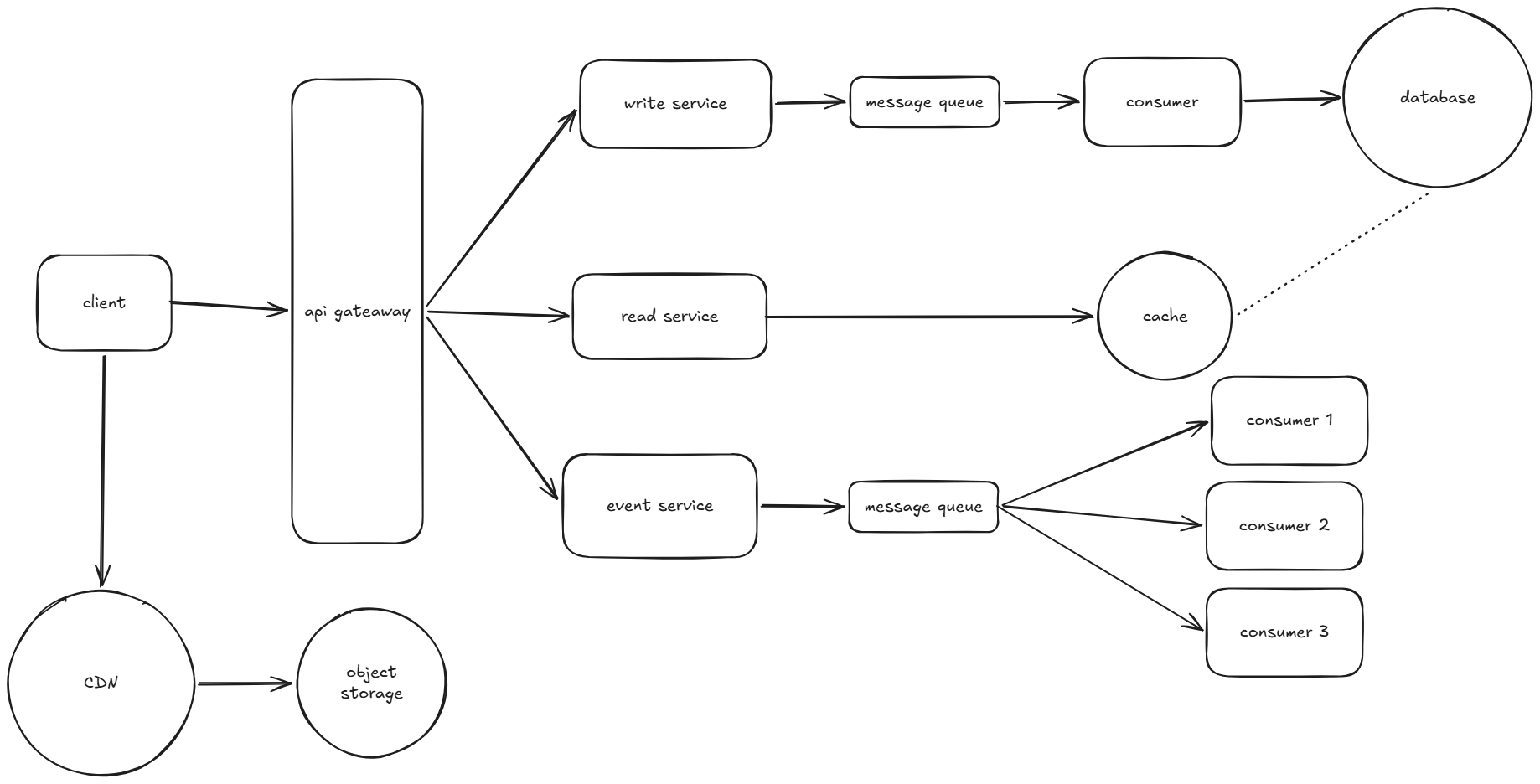
The goal isn't to use every component, but to add what the system actually needs.
5. Deep Dive
Now revisit the design against the non-functional requirements.
This is where you make the deeper architectural decisions and consider the trade-offs between different approaches.
For example, how will the system scale? What happens when a service fails? How is data persisted? How can latency be reduced? How is the system secured?
The answers to these questions might lead to changes in the original design, such as adding caching, replicas, load balancing, queues or other components.
Takeaway
System design is pretty cool. What starts as a simple idea can turn into a system with hundreds of components, all solving different problems and working together.
The more I learn, the more interesting it becomes to see how simple ideas can evolve into systems that handle millions of users, huge amounts of data, and all the things that can go wrong.
Although, most of the time, the answer is probably just a web server and a database.